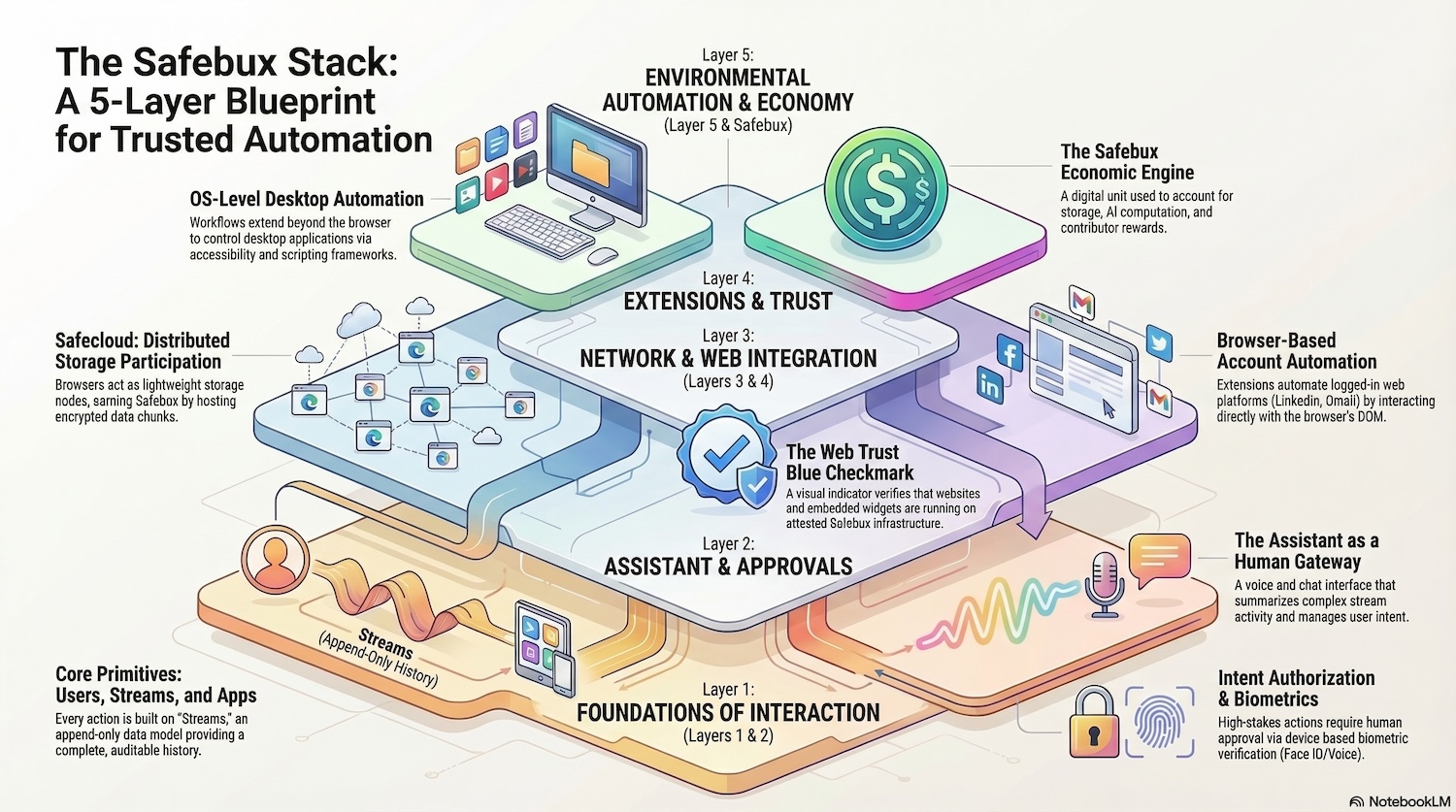
A Five-Layer Architecture for Trusted Automation, Collaboration, and Self-Organizing Systems
Modern computing infrastructure evolved in fragments. Identity systems, collaboration tools, AI assistants, cloud storage, websites, and automation platforms were built independently. The result is a digital ecosystem where data is fragmented, automation is unsafe, and organizations struggle to coordinate securely across systems.
Safebox proposes a different model.
Instead of treating identity, data, AI, automation, and collaboration as separate products, Safebox organizes them into a five-layer stack. Each layer builds on the one below it, forming a coherent architecture for trusted computing, organizational coordination, and AI-assisted workflows.
The Safebox stack enables people and organizations to store knowledge, automate tasks, collaborate across institutions, and participate in decentralized economies—while maintaining control over their data and permissions.
The five layers are:
- Users, Streams, and Embeddable Applications
- Safebox Assistant with Voice Interface
- Safebox Site: Distributed Storage and Organization Management
- Browser Extensions for Personal Automation and Web Trust
- OS-Level Personal Computer Automation
Together, these layers form an ecosystem where human intent, automation, AI workflows, and economic systems operate safely and transparently.
Layer 1: Users, Streams, and Embeddable Applications
The foundation of Safebox is Layer 1, which defines the core primitives of the system.
These primitives are:
- Users
- Streams
- Embeddable Applications
Everything in Safebox is built on top of these building blocks.
Users
Users represent people, organizations, or roles.
Examples include:
- individuals
- companies
- communities
- project teams
- AI agents
- automated services
Users can have permissions, roles, and responsibilities within organizations and projects.
For example:
- a person might be an admin in one organization
- a viewer in another
- and a participant in a project
Safebox supports hierarchical roles and structured collaboration across organizations.
Streams
Streams are the fundamental data structure of Safebox.
A stream represents a sequence of messages that collectively define an object.
Examples of streams include:
- posts
- documents
- events
- tasks
- contracts
- AI workflows
- data feeds
Streams can relate to each other, forming a graph of knowledge.
For example:
- a research document stream may relate to a project stream
- a project stream may relate to an organization stream
- a proposal stream may relate to a governance vote
Because streams are append-only and ordered, they provide:
- history
- consistency
- auditability
- collaboration
Streams allow many users to interact with shared data structures safely.
Embeddable Applications
On top of users and streams, Safebox provides embeddable applications.
These applications can be embedded into websites, community portals, or collaboration tools.
Examples include:
- governance voting
- community polls
- auctions
- subscription systems
- fundraising campaigns
- contests and bounties
- community income distribution
These applications allow organizations to run economic and governance systems directly inside their websites.
Market Mechanisms
Layer 1 includes tools for price discovery and exchange.
Examples:
- auctions
- token sales
- ticket sales
- subscriptions
- digital marketplaces
These allow communities to sell access, services, or goods.
Blockchain smart contracts can optionally handle settlement and transparency.
Governance Systems
Communities can also coordinate decisions using governance tools.
Examples include:
- voting systems
- proposal systems
- DAO governance
- committee decisions
- referendums
These tools allow communities to collectively determine policies, allocate resources, or choose leaders.
Coordination Systems
Organizations frequently need to coordinate effort around shared goals.
Layer 1 supports this through:
- contests
- bounties
- hackathons
- campaigns
- project funding
Participants submit contributions, and communities evaluate results.
Rewards can then be distributed.
Resource Distribution
Once value is created, it must be distributed.
Layer 1 includes systems for:
- income payouts
- contributor rewards
- grants
- stipends
- retroactive funding
- universal basic income experiments
Communities can distribute economic value to contributors automatically.
Embedding in Websites
Safebox applications can be embedded into external websites.
Examples include:
- voting widgets
- discussion feeds
- marketplaces
- ticket sales
- membership portals
Organizations can integrate Safebox functionality into their existing websites without rebuilding their infrastructure.
Safebux
Many activities in the Safebox ecosystem involve Safebux, the system’s native economic unit.
Safebux can be used for:
- storage
- AI computation
- workflow execution
- rewards
- micropayments
- community incentives
Safebux enables decentralized economic coordination across the system.
Layer 2: Safebox Assistant with Voice Interface
Layer 2 introduces the Safebox Assistant.
This layer provides the human interface to the Safebox ecosystem.
The assistant can operate through:
- web chat
- voice interface
- notifications
- the Groups mobile app
It allows users to interact with Safebox systems in a natural and conversational way.
Voice Interaction
Users can interact with the assistant through voice.
This is particularly useful in hands-free environments such as:
- driving
- walking
- multitasking
The assistant can:
- summarize updates
- read messages
- report on workflows
- notify users of events
Users can respond with voice commands to approve or modify actions.
Notifications and Digests
The assistant can proactively notify users of updates they care about.
Examples include:
- new artifacts created by colleagues
- new governance proposals
- incoming messages
- project updates
- AI workflow results
Notifications can include short spoken summaries.
Users can also receive daily digests summarizing activity across projects and organizations.
Intent Approval
Many automated actions require explicit approval.
The assistant enables intent authorization.
Examples include:
- approving financial transactions
- authorizing AI actions
- signing blockchain transactions
- approving large mail merges
- authorizing outreach campaigns
Approvals can be confirmed using:
- biometric authentication
- voice authorization
- device authentication
Importantly, biometrics are always collected on devices owned by the user, not remote servers.
Contacts and CRM
Through integration with the Groups app, the assistant can manage:
- contacts
- groups
- follow-ups
- sales pipelines
- introductions
It can help maintain relationships and suggest outreach opportunities.
External Communication Platforms
Users can interact with Safebox through external platforms when the assistant is unavailable.
Examples include:
- Telegram bots
- Apple Business Messages
- Google Business Messages
- email digests
- web forms
These interfaces allow participation without installing dedicated apps.
Layer 3: Safebox Site, Distributed Storage and Organization Management
Layer 3 provides a browser-based interface called the Safebox Site.
It serves two main purposes:
- distributed storage participation
- organization and integration management
Distributed Storage
Users can contribute storage to the Safebox network.
The browser stores encrypted data chunks using:
- IndexedDB
- service workers
- background processes
This contributes to the Safecloud, a decentralized storage layer.
Participants earn Safebux for providing storage capacity.
Organizational Management
Users can manage their roles in organizations.
Examples include:
- joining organizations
- managing permissions
- administering projects
- managing communities
Admins can configure integrations such as:
- SMTP email servers
- Telegram bots
- Apple Business Messaging
- Google Business Messages
- domain API keys
These integrations allow organizations to communicate with customers and members.
Local File Access
The Safebox Site can also access authorized folders on a user’s local machine.
This allows:
- syncing artifacts
- uploading documents
- downloading results
Local files are distinct from Safecloud storage.
Layer 4: Browser Extensions, Personal Automation and Web Trust
Layer 4 introduces browser extensions, which extend Safebox functionality into existing web platforms.
There are two main components:
- Groups Extension
- Safebox Extension
Groups Extension
The Groups extension enables personal account automation.
Users can automate interactions with websites where they are logged in.
Examples include:
- X (Twitter)
- Gmail
- WhatsApp Web
- Telegram Web
- many CRM tools
The extension can:
- navigate pages
- collect information visible to the logged-in user
- trigger DOM events
- assist with outreach campaigns
- build CRM pipelines
Automation is rate-limited to avoid detection.
Contact-Aware Personalization
The extension can also personalize websites locally.
For example:
- showing which contacts appear on a page
- highlighting connections
- suggesting introductions
This happens locally without sharing personal data with external services.
Web Trust Verification
The Safebox extension can verify that websites and embedded iframes are trusted.
It displays a blue verification checkmark indicating that content is:
- cryptographically verified
- served with integrity guarantees
This extends the concept of HTTPS into attested web applications.
Storage Expansion
Browser extensions can also contribute storage resources to Safecloud.
Background processes and service workers allow storage participation even when pages are not actively open.
Layer 5: OS-Level Personal Computer Automation
The final layer integrates Safebox with operating systems.
This enables automation beyond the browser.
Desktop Automation
Operating system automation tools allow Safebox workflows to interact with:
- desktop applications
- system dialogs
- file systems
Examples include:
- macOS Accessibility APIs
- Windows Automation APIs
- Linux desktop automation frameworks
These allow software to control user interface elements.
Script Automation
Systems such as:
- AppleScript
- Automator
- shell scripts
- workflow engines
can execute automation workflows triggered by Safebox events.
For example:
- processing files
- launching applications
- approving tasks
- triggering scripts
Workflow Execution
This layer allows Safebox workflows to interact with local computing resources.
Examples include:
- batch document processing
- video rendering
- AI model execution
- data analysis pipelines
The user’s personal computer becomes part of the Safebox automation environment.
Why the Safebox Stack Matters
The Safebox stack provides something that modern computing lacks:
a coherent architecture for trusted automation and coordination.
Instead of relying on centralized platforms that control data and workflows, Safebox allows people and organizations to operate within an open ecosystem.
Key benefits include:
- trusted automation
- transparent governance
- decentralized economic coordination
- AI-assisted collaboration
- user-controlled data
Infrastructure providers such as cloud companies or governments can host parts of the system, but they cannot arbitrarily control the workflows and knowledge stored within Safebox.
Communities can self-organize.
Organizations can collaborate.
Individuals can automate their digital lives safely.
Toward a Safer AI Future
As artificial intelligence becomes more powerful, the question of control and governance becomes critical.
Safebox provides a framework where AI systems operate under human-approved policies, where actions require explicit intent authorization, and where knowledge is organized transparently.
This architecture helps prevent scenarios where uncontrolled automation creates systemic risk.
Instead of an AI-driven catastrophe, Safebox enables human-aligned automation.
The Vision
Over time, Safeboxes may store not only documents and workflows but also:
- datasets
- AI models
- knowledge graphs
- scientific discoveries
- organizational processes
As more organizations adopt Safebox, the system becomes a global network of trusted knowledge and coordination infrastructure.
In this vision, Safebox is not merely software.
It is a distributed operating system for human collaboration, automation, and economic coordination.
And the Safebox Stack is the architecture that makes it possible.